NWS Weather Report
- 4.4
- Rating
- 10.00K
- Installs
- Free
- Price
 Analysis by App-foxy
Weather apps often promise a lot, but I usually judge them by one question: can I make a better decision before the weather changes? NWS Weather Report is built around that practical test. This free weather app from Weather Report LLC combines live radar, forecasts, and severe weather notifications connected to NOAA information, so its main value is not a decorative forecast screen. It is the chance to see developing conditions and react before they become a problem.
I found it most useful when I needed to understand the next few hours rather than simply check whether tomorrow would be warm. The app is available for everyone, runs on Android with a minimum operating system of 10, and its current version is 8.2.0. It has reached over ten thousand installs, with a 4.4 average from more than a hundred ratings. Those figures suggest a small but positive user base rather than a huge mainstream platform, which matches my impression: this feels like a focused weather tool for people who want timely information without turning weather into a complicated hobby.
Why NOAA-backed severe weather information matters
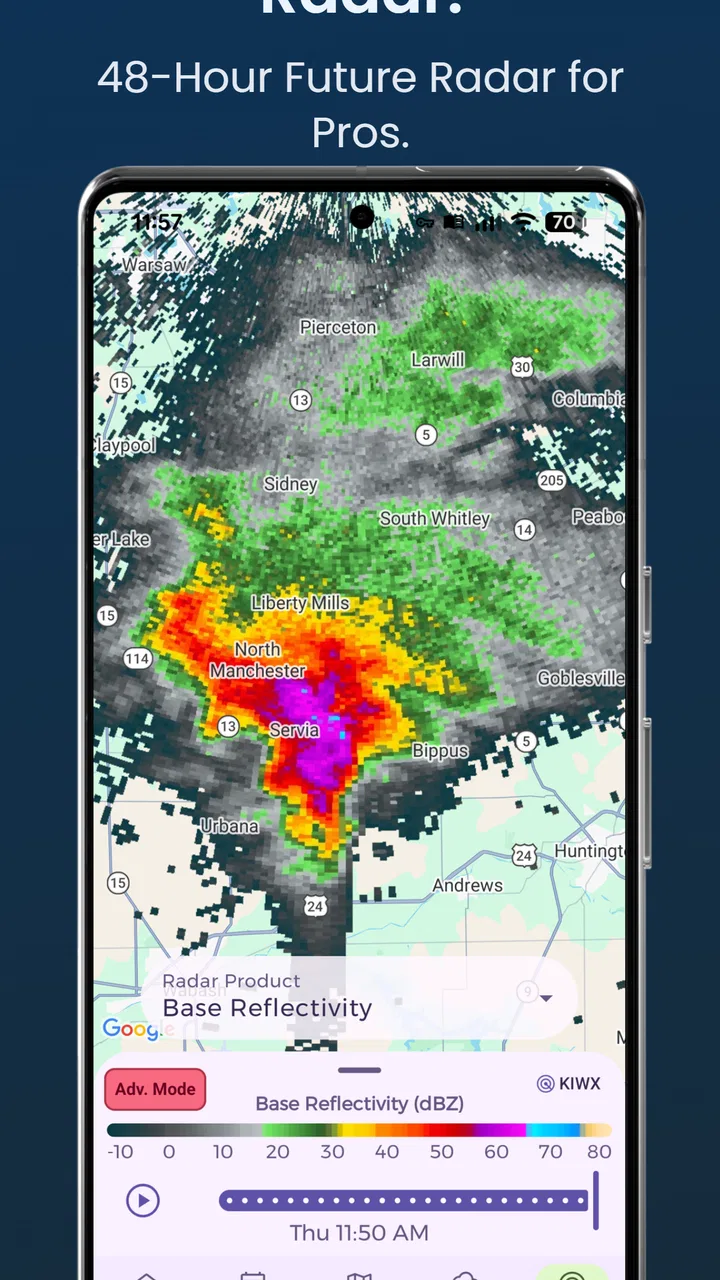
The standout capability is the combination of radar awareness and severe weather alerts from NOAA. A normal daily forecast can tell me that rain is likely, but it does not always answer the question I actually have: is the rain approaching my neighborhood now, and is it worth changing my plans? Radar is useful because it gives the forecast a moving visual context. Instead of treating the chance of precipitation as an abstract percentage, I can look for the direction and development of weather near me.
You May Also Like

 Pandora - Music & Podcasts
Pandora’s Music Is Easy to Start, but Harder to Recover
Pandora’s strength is its low-effort path from a seed to a station. Its weak spot is how much confidence it asks you to place in connection, setup, and quiet recovery.

 AccuWeather: Weather Radar
AccuWeather Review: A Quick, Clear Forecast for Everyday Decisions
For everyday plans, the best forecast is the one you can understand quickly. AccuWeather makes rain timing, radar, and local conditions easy to act on, with a few trade-offs.

 Hill Climb Racing
Why Hill Climb Racing Still Turns Crashes Into One More Run
A tiny car, a bumpy hill and one more upgrade: Hill Climb Racing keeps resurfacing because its simple chaos makes every near-miss feel personal.

 AliExpress - Shopping App
AliExpress Makes Global Shopping Feel Personal, but Shoppers Bear the Risk
AliExpress turns a global marketplace into a pocket-sized discovery engine. Its reach is useful, its shopping loop compelling, and its trade-offs easy to miss.

 Lords Mobile: Kingdom Wars
Lords Mobile Is a Kingdom-Building Routine, Not a Quick Match
A case-by-case verdict on the building, battles, device demands, and social commitments that make Lords Mobile rewarding for some players and exhausting for others.

 PDF Scanner app - TapScanner
TapScanner Makes Paperwork Easier to Capture, Check, and Share
TapScanner makes scanning with a phone feel less like a rescue operation and more like a dependable step in getting work done. Its capture tools are useful, though not flawless.
More From Our News Desk
View All News


That distinction matters in ordinary situations. If I am deciding whether to walk, drive, exercise outdoors, or leave laundry outside, a broad forecast may be too general. A live radar view can reveal that a shower is passing away, that another band is moving in, or that the weather is developing faster than the morning forecast suggested. The app’s severe weather focus adds another layer: when conditions become dangerous, an alert is more useful than repeatedly opening a forecast and hoping I notice an important change.
I would not describe this as a replacement for judgment, local emergency instructions, or official warnings. Weather information changes quickly, and a radar image still requires interpretation. The real benefit is that NWS Weather Report puts short-term awareness and serious alerts closer together. That makes it more useful than a simple temperature widget when the question is whether to act now.
The NOAA connection also gives the app a clear identity. Many weather apps compete through visual polish, lifestyle extras, or increasingly elaborate personalization. This one is easier to understand: it is aimed at people who want a practical view of current conditions and warnings. I appreciate that focus because it keeps the central use case clear, especially during unsettled weather.
Reading the radar without overreacting
Radar is powerful, but it is easy to misuse. A colored patch on a map does not automatically mean severe weather at my exact location, and a storm’s edge can weaken or intensify as it moves. I use the radar to estimate timing and direction, then compare that picture with the forecast and any alert details. That simple habit prevents the common mistake of treating every bright color as an immediate emergency.
One practical tip is to check the radar twice when a decision matters: once before leaving and again shortly afterward if the weather is changing quickly. The first look gives me a rough plan; the second tells me whether the system is moving as expected. This is where the app is more valuable than a static morning forecast. It supports a quick feedback loop instead of asking me to trust one prediction all day.
Another useful approach is to use the radar for timing, not false precision. I would not plan an outdoor event around an exact minute based on a moving image. I would use it to decide whether I have a reasonable window, whether I should carry rain protection, or whether postponing is sensible. That is a small but important trade-off: the app can improve decisions without eliminating uncertainty.
How it feels in everyday use
The app’s free entry point makes it easy to try without committing to a subscription or purchase. I can open it when I need a current view, check the forecast, and use the radar when the next few hours matter. Its store category is weather, but the experience is closer to a decision aid than a passive information page. I am not only looking for a high temperature; I am trying to understand what the sky may do next.
Severe weather alerts are especially important because they change the relationship between the app and the user. A forecast requires me to remember to check it. An alert can bring attention to a developing risk when I am busy with something else. That does not mean I should enable every notification without thinking. I would review the alert settings carefully and decide which warnings are useful for my location and routine. Too many interruptions can make people ignore the next one, while too few can leave a real gap in awareness.
For a person who commutes, the most useful workflow is to check conditions before leaving rather than relying only on a morning glance. If a storm is forming along the route, the radar can encourage an earlier departure, a different route, or a short delay. For someone caring for children, pets, or older relatives, the same information can help decide whether an outdoor plan should move indoors. These are modest decisions, but they are exactly where timely weather information earns its place.
I also see value for people who work outside. A landscaper, delivery driver, photographer, or maintenance worker may not need a complex meteorological dashboard, but a general daily forecast can be too vague. Radar and alerts help answer whether a work block is likely to remain practical. The app cannot remove the need for safety procedures or employer guidance, yet it can make the first planning decision more informed.
A realistic rainy-day example
Imagine I am planning to walk across town in the afternoon. The morning forecast says rain is possible, which is not enough information to decide whether I should change plans. Before leaving, I open the app and check the current radar. If the nearest precipitation is moving away, I may go with a light jacket. If a stronger-looking area is approaching and a warning appears, I would postpone the walk or choose transport instead.
The important part is not that the app predicts the weather perfectly. It gives me a way to compare the broad forecast with what is happening now. If the radar changes while I am getting ready, I can adjust rather than treating the original forecast as fixed. That is the concrete advantage I noticed most: the app is useful at the moment a plan becomes real.
For a family outing, I would use the same process but add more caution. A short shower may be manageable for adults, while lightning or a severe weather notification changes the decision completely. The app’s alert function is valuable here because it shifts attention from convenience to safety. Still, I would follow the warning instructions themselves and seek shelter when appropriate instead of waiting for the radar picture to look reassuring.
Where the app is strong and where it asks for patience
The strongest part of NWS Weather Report is its emphasis. Live radar and severe weather alerts work together naturally: radar helps me watch the situation, while alerts help me notice when the situation deserves immediate attention. That pairing is more useful than a forecast that only lists temperatures. It also gives the app a clear reason to exist alongside the weather information already built into many phones.
The main limitation is that radar is not automatically simple. A first-time user may see a map full of colors and still wonder what matters. The app can show the situation, but I still need to develop a basic reading habit: identify my location, check movement, look at the forecast period, and pay attention to official warnings. If I want a one-second answer such as “take an umbrella or not,” a compact phone widget or voice assistant may feel faster.
Another trade-off is the difference between current conditions and longer planning. Radar is excellent for near-term decisions, but it is not the best tool for arranging a vacation, scheduling a weekend event, or comparing several future days. For those jobs, I would still want a clear extended forecast and perhaps a calendar-based planning tool. NWS Weather Report is most convincing when the weather is actively changing, not when I am making plans far ahead.
The app is free to download, although in-app purchases range from $1.99 to $59.99 per item. That means I would pay attention to what any optional purchase adds before spending money. The free version is enough to evaluate the core experience, so I would not buy anything immediately. I would first use it through several normal weather patterns and decide whether the extra value fits my routine. A person who only checks the temperature occasionally may never need an optional purchase.
There is also a question of notification discipline. Severe weather alerts are useful only when they remain meaningful. If I treat every notification as equally urgent, I may become desensitized. I would keep the app for important warnings and use the radar for ordinary rain decisions. That division makes the alerts feel more serious and prevents the app from becoming a source of constant background noise.
How it compares with familiar alternatives
Compared with the default weather app on a phone, this app’s appeal is its more deliberate focus on radar and NOAA severe weather information. A built-in app is often faster for a glance at temperature, daily highs, or a simple forecast. If that is all I need, switching may not be worthwhile. NWS Weather Report becomes more attractive when I want to watch nearby conditions and receive weather-related warnings in one place.
Compared with a general forecast service, it feels less like a broad lifestyle dashboard and more like a monitoring tool. Some alternatives may offer richer long-range charts, more location customization, or more polished presentation. Those can be better for travel planning or people who enjoy comparing detailed forecast models. I would choose this app instead when the practical question is whether weather is approaching and whether it could become hazardous.
It also differs from relying directly on a browser or an official weather website. A website can provide authoritative information, but an app is easier to check repeatedly during a busy day. The advantage is convenience, not a promise that the app replaces official emergency communication. For major events, I would use every relevant source available, including local authorities and emergency instructions.
Who will get the most from it
I think NWS Weather Report is a good fit for people whose plans depend on the next few hours: commuters, outdoor workers, runners, parents arranging activities, and anyone living in an area where severe weather can develop quickly. It is also a sensible choice for users who want a free starting point and prefer a focused weather experience over a crowded app filled with unrelated extras.
People who should skip it are those who only want a tiny glance at the current temperature, those who mainly plan weeks ahead, or anyone unwilling to interpret a radar map. A simple widget will be less demanding for the first group, while a more comprehensive forecasting service may suit the second. The app is not a magic answer for uncertain weather; it is a better set of signals for making short-term choices.
Because the content rating is Everyone, it is suitable as a general household weather tool. I would still teach younger users what an alert means rather than assuming the notification alone explains the right response. The app can support awareness, but adults should handle serious decisions and make sure children understand when to move indoors or follow local instructions.
Weather Report LLC has kept the concept straightforward: current radar, forecasts, and NOAA severe weather alerts in a free weather application. My recommendation is based less on the size of its user base and more on how well that combination fits a real routine. I would install it before a stormy season, test the radar during ordinary rain, and adjust notifications before depending on it for important plans.
After using it with that expectation, I see NWS Weather Report as a practical companion rather than an all-purpose weather universe. Its best feature is not simply that it displays radar; it is that radar gives context to alerts and turns a vague forecast into a more timely decision. If you want quick, near-term weather awareness and are willing to spend a moment interpreting what you see, it is worth trying. If you want effortless temperature checks or deep long-range planning, another option may serve you better.
FAQs for NWS Weather Report
01What is NWS Weather Report, and what information does it provide?
NWS Weather Report is a weather-focused app that presents forecasts and alerts based on information from the U.S. National Weather Service. It can help users check current conditions, hourly or daily forecasts, radar-related information, severe weather warnings, and other local updates. The exact features may vary by version, supported location, and the data sources available in your region.
02Does NWS Weather Report provide accurate and up-to-date weather forecasts?
The app relies on National Weather Service data, which is generally considered a dependable source for weather forecasts and official warnings in the United States. However, weather conditions can change quickly, and forecast accuracy may differ depending on location, season, and forecast range. Users should treat the app as a helpful guide and check official emergency instructions during dangerous weather.
03Can I receive severe weather alerts with NWS Weather Report?
NWS Weather Report may display official alerts such as tornado warnings, severe thunderstorm warnings, flood advisories, winter weather notices, and other hazardous-weather messages. Alert availability depends on the app’s notification settings, location permissions, internet connection, and the features included in the installed version. Before relying on alerts, review the settings and confirm that notifications are enabled.
04Does the app require my location, and can I use it for multiple places?
The application may request location access so it can show forecasts and warnings for your current area. Depending on the version, you may also be able to search for or save additional locations, which is useful for checking conditions at home, work, or while traveling. If you prefer not to share your precise location, manually entering a city or ZIP code may be an available alternative.
05Is NWS Weather Report free to download and use?
NWS Weather Report may be available as a free download, although the store listing should be checked for the current pricing model, advertisements, optional purchases, or premium features. Some functions can also depend on internet access and device permissions. Before installing, review the app’s latest store description, privacy details, supported operating system requirements, and developer information.
Pros
- Official forecasts and alerts from the U.S. National Weather Service
- Reliable radar
- warnings
- and severe-weather information
- Useful hourly and extended forecasts for planning ahead
- Covers locations across the United States and its territories
- Weather updates come from a trusted government source
Cons
- Primarily useful for users in the United States
- Interface may feel less polished than commercial weather apps
- Some features depend on available local NWS data
- Can provide more technical detail than casual users need
- No built-in international weather coverage

NWS Weather Report
Gallery